Posts

JayWay - Reading the Response -Json Array Response- JsonPath query

 JayWay Repsonse: JsonPath quest 1-  //single attribute : List<?>     List<Object> lst = dc.read("$[?(@.price>54)].price"); //mutlple attribute : List<Map<String,Object>> List<Map<String, Object>> ListHashThree = dc.read("$[?(@.category=='jewelery')].['title','price','id']");   package JaywayJsonPath; import static io.restassured.RestAssured.given; import java.util.List; import org.testng.annotations.Test; import com.jayway.jsonpath.JsonPath; import com.jayway.jsonpath.ReadContext; import io.restassured.RestAssured; import io.restassured.response.Response;   public class JayWayJsonResponse {                @Test                public void fakeJayWayTest() {                     ...
Serialization -Converting pojo into Json; De-Serialization -Converting json into pojo;

Serialization -Converting pojo into Json;   1- create a pojo class package Deserialization; package lombokeg; import java.util.List; import lombok.AllArgsConstructor; import lombok.Builder; import lombok.Data; import lombok.NoArgsConstructor; @Builder @Data @NoArgsConstructor @AllArgsConstructor public class User { private int page; private int per_page; private int total_pages; private int total; private List<UserData> data; private Support suprt; @Builder @Data @NoArgsConstructor @AllArgsConstructor public static class UserData { private int id; private String email; private String first_name; private String last_name; private String avatar; } @Builder @Data @NoArgsConstructor @AllArgsConstructor public static class Support { private String url; private String text; } } 2- package Test; import static io.restassured.RestAssured.given; import static org.hamcrest.Matchers.equalTo; import java.util.Arrays; import org...

Http : post- Body with Text,JavaScript,XML,HTML,Multipart,PDF

 HTTP -post- Body with Text,JavaScript,XML,HTML,Multipart,PDF public class postwithDifferentData { @Test public void bodywithsimpleText() { RestAssured.baseURI = "http://httpbin.org"; String BodyText = "Hello world API!!!"; given().log().all() .contentType(ContentType.TEXT) . body(BodyText) .when().log().all(). post("/post") .then().log().all() .assertThat().statusCode(200).body("data", equalTo("Hello world API!!!")); } Body with Java Script: public void bodywithsimpleJavaScript() { RestAssured.baseURI = "http://httpbin.org"; String JavaScript = "<script>\r\n" + "var x, y, z; \r\n" + "x = 5;    \r\n" + "y = 6;    \r\n" + "z = x + y;  \r\n" + "document.getElementById(\"demo\").innerHTML =\r\n" + "\"The value of z is \" + z + \".\";\r\n" +...

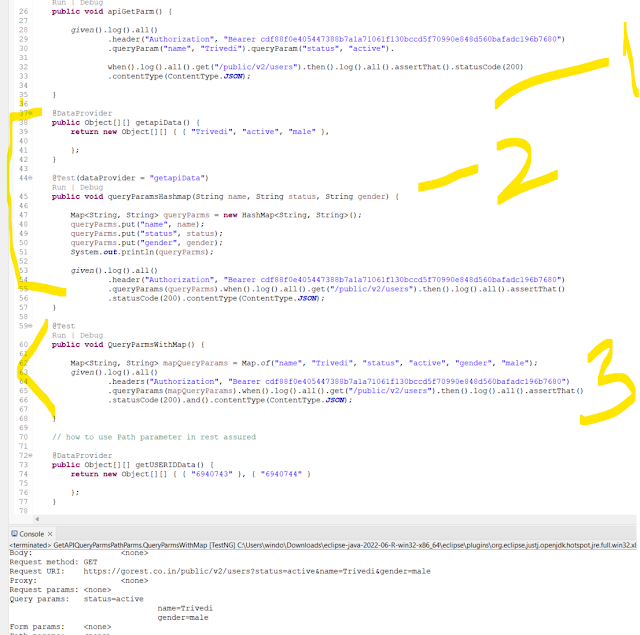
Passing Query Parameters in RestAssuredd

Image
 3 Ways to pass Query Parameter: Way 1: .queryParam("name", "Trivedi").queryParam("status", "active"). @Test public void apiGetParm() { given().log().all() .header("Authorization", "Bearer cdf88f0e405447388b7a1a71061f130bccd5f70990e848d560bafadc196b7680") .queryParam("name", "Trivedi").queryParam("status", "active"). when().log().all().get("/public/v2/users").then().log().all().assertThat().statusCode(200) .contentType(ContentType.JSON); Way 2 using dataprovider and HashMap & Put @DataProvider public Object[][] getapiData() { return new Object[][] { { "Trivedi", "active", "male" }, }; } @Test(dataProvider = "getapiData") public void queryParamsHashmap(String name, String status, String gender) { Map<String, String> queryParms = new HashMap<String, String>(); queryParms.put(...

Azure

 Service Bus Explorere: Azure Services: Azure Service Bus is like a message delivery service for your apps. Imagine you have different parts of a system (like a website, a payment service, and a shipping service), and they need to talk to each other. Instead of connecting them directly, which can get messy, Azure Service Bus acts as a middleman. Service bus :  we see the queues and the deadlocks for services 1-Create a namespace for qa,dev,stage,preprod and prod 2- we will have the queues .. for our project we have queue like Application flow with be create proposal: place an proposal order with duration , agency,advertiser,market,zones,price. order_createpropsl, order_createLinord order_createdigord order_createorder order_publshorder Order_validateorder Order_validaAgency Order_validaAdvertiser Order_submitOrder EAS- 1time-OSP- response back to EAS Function App- used to start/stop the feature flags in the project. Turn off and turn on. Proposal creation with only linear /dig...

Serialization

Image
Converting pojo to Json is Serialization:

LomBok and annotations

 package lombokeg; import lombok.AllArgsConstructor; import lombok.Builder; import lombok.Data; import lombok.NoArgsConstructor; /*  * Lombok is a 3rd party library , add it in pom.xml and download the jar and install in workspace eclipse location  * it auto give the setters,getters,cnstructors with augs and no args- using the annotations like below   *   *   */ @Data @Builder @AllArgsConstructor @NoArgsConstructor public class User { private String email; private String username; private String password; private String phone; private Name name; private Address addres; @Data @Builder @AllArgsConstructor @NoArgsConstructor public static class Name { private String firstname; private String lastname; } @Data @Builder @AllArgsConstructor @NoArgsConstructor public static class Address { private String city; private String street; private int number; private String zipcode; private Gealocation...